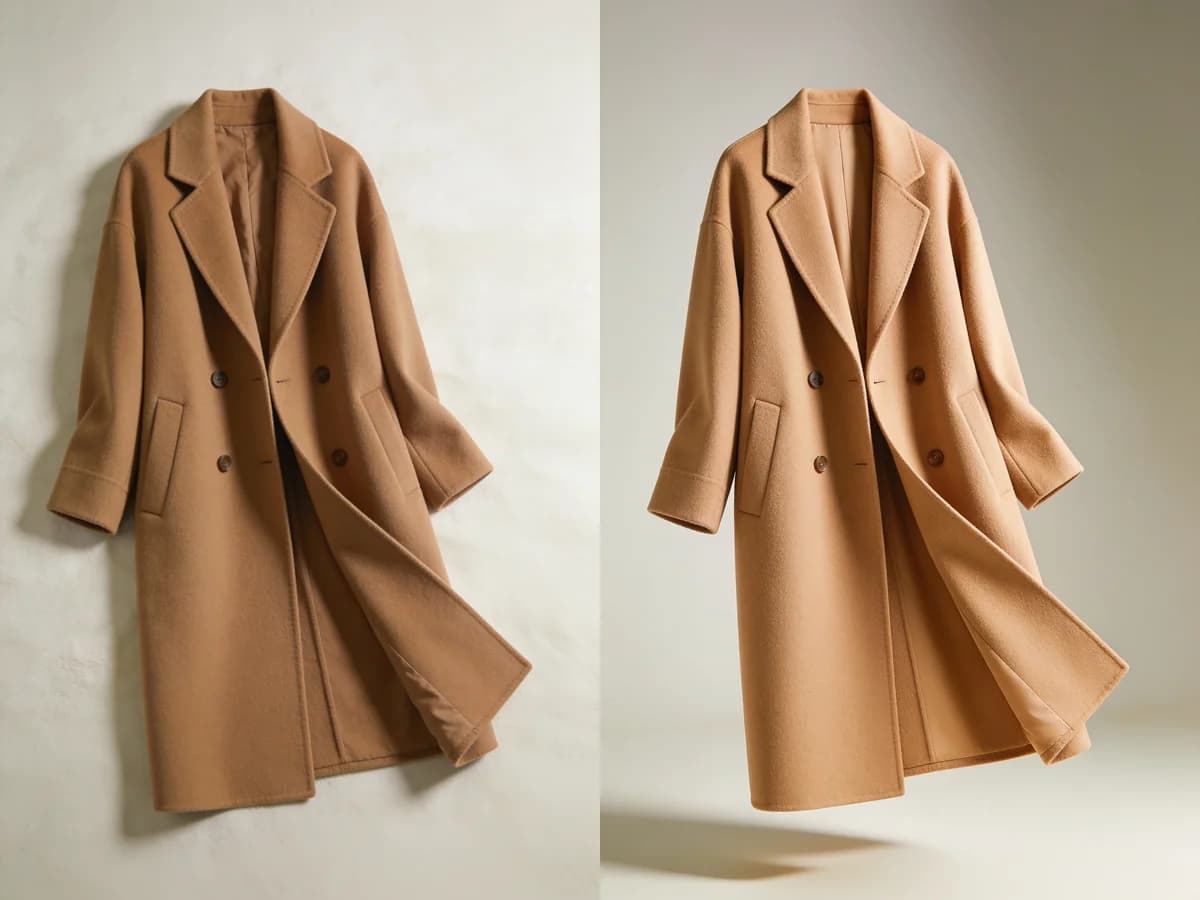
What it does
Upgrade simple clothing photos into polished, studio-style images, perfect for cleaner product visuals, fashion content, or wardrobe presentation.
Built for resellers, small businesses, and anyone who wants their pieces to look professionally shot, without a studio.
The quality gap between a phone snap and a proper product photo has always been expensive to close. Studio Shot closes it in seconds. For anyone selling secondhand clothes, launching a small label, or just wanting their wardrobe to look its best, that shift in presentation changes how a piece is perceived before anyone reads a word of description.
Why it helps
Product photography has always served a specific psychological function: it signals that a seller took care. A well-lit, cleanly composed photo tells a buyer that the item was considered, handled, and presented with attention. A blurry phone snap in poor light sends the opposite message, regardless of how good the actual garment is. Studio Shot transfers that first impression from the quality of your equipment to the quality of the piece itself.
For the secondhand and resale market specifically, presentation is one of the few variables a seller can control. Condition is fixed, price is competitive, but photography is where you can differentiate. A listing with polished images tends to attract more views, generate more inquiries, and complete faster than the same item photographed carelessly. The upgrade is not cosmetic; it directly affects outcomes.
For personal wardrobe use, the value is different but equally real. A digital wardrobe full of clean, consistent imagery is more enjoyable to use and easier to work with when building outfits. When every photo is shot at a different angle, in different lighting, against a different background, the visual information becomes harder to compare. Studio Shot brings consistency to the whole catalogue.
How it works
Upload a flat-lay
Add a plain photo of your clothing item.
Let AI elevate it
The piece is turned into a clean studio shot.
Use it anywhere
Export polished images for listings or content.
What you can do
- Create clean product photos for resale listings
- Give a small fashion business a professional look
- Present your wardrobe beautifully
- Skip the cost of a studio shoot
Tips for best results
- 1Lay the garment flat on a clean white or neutral surface and smooth out any wrinkles before shooting; the AI works best with a wrinkle-free starting image.
- 2Shoot from directly above rather than at an angle, as overhead flat-lay photos give the AI the clearest silhouette to work with.
- 3For textured or embellished pieces, use a macro or portrait mode on your phone to capture surface detail before uploading so those details carry through to the final image.
- 4Process pieces from the same category in one session so the resulting images share a consistent look when displayed together in listings or a wardrobe catalogue.
Frequently asked questions
What is Studio Shot and what is it for?
Studio Shot turns ordinary clothing photos into professional, studio-quality product images. You present your pieces with polished, clean visuals, without an expensive shoot.
Does it turn my plain clothing photo into studio quality?
Yes. You upload a flat or simply taken clothing photo, and Klodsy turns it into a clean, well-lit, professional-looking studio image.
What kind of photo should I upload?
For the best result, use a clear, simple photo of the clothing taken on a flat surface. The cleaner and tidier the piece looks, the higher the quality of the result.
Is it useful for reselling or listings?
Definitely. Listing your second-hand items with cleaner, more professional images builds buyer interest and trust. A polished photo helps your listing stand out.
Can I create product photos for my brand or small business?
Yes. Small brands and sellers can use Studio Shot to present their products with studio-quality visuals. You get a professional look without expensive shoots.
What types of clothes can I transform?
You can transform photos of tops, dresses, outerwear, and many other pieces into studio images. Any well-shot piece can become a clean product image.
Does it save me the cost of a professional studio or photographer?
Yes. Instead of renting a studio or hiring a photographer, you turn a phone photo into a professional image in seconds. It saves both time and money.
Can I save and export the images?
Yes. You can save and export the studio images you create and use them in your listings, content, or anywhere you want.
Can I also use it to present my wardrobe nicely?
Of course. It is not just for sellers; it suits anyone who wants to present their own clothes with tidy, stylish visuals.
What makes Studio Shot different from other photo editing tools?
Most tools only apply filters or retouching; Studio Shot turns a flat clothing photo into a full professional product shot. The result looks like it was taken in a studio.
Can Studio Shot create the ghost mannequin effect?
Yes. Studio Shot can present a garment with the clean, worn look known as the ghost mannequin or invisible mannequin effect, where the clothing keeps its shape with no body or mannequin showing. You get that professional product look from a single photo, with no real mannequin and no manual editing.
Explore more features
Your wardrobe, smarter.
Download Klodsy free on iOS and Android.